Showing posts with label management. Show all posts

Tuesday, August 29, 2006

Know your end users

On a Saturday morning, I went to a bank to do some over the counter transaction. I was attended by a customer service staff who used a Dell desktop computer with an LCD monitor.

My request takes many forms to be filled and a lot of data entries to be made to the system. I couldn't see the monitor, but I just imagine by looking at how busy the female banker was entering data using the keyboard. Surprisingly, she didn't use the mouse at all and rely entirely on the keyboard and its function keys (F1-F12). The mouse is connected to the computer, but she put it in front of the keyboard so I believe she just want to make some space by getting rid of it.

On another ocassion in a travel agency, I notice a diffent balance between keyboard and mouse usage. I was booking for an airline ticket and the staff attending me used both keyboard and mouse. However, he used the keyboard much more frequently to enter not-so-user-friendly commands on the terminal window and only few times used the mouse to click on the big toolbar located on top of the terminal window. Perhaps the toolbar is used to execute a simple command like 'Print Flight Itinerary'.

Drawing from the two short scenarios above, we can see that different users have different way to use the application. Naturally, the platform of an application defines its limitation, like in a terminal window where everything is text, keyboard is definitely the main input device. However, in most today's applications, desktop-based or web-based, the mouse and the keyboard are both acceptable input devices. But still many people choose to mainly use keyboard alone. They do have valid reasons, most probably because they are so familiar with the keyboard and therefore can operate faster compared to using the mouse.

It is paramount for us, the software developers, to know the behaviour of the end users who will actually use the application we build. Imagine if we develop a cool interactive web application, fully enriched with DHTML popups, animations, and drag and drops, only to realize later after the release that the users prefer to navigate using combinations of keyboard arrows and tabs rather than the mouse.

I highly recommend developers, who spent most of the time behind the stage, to come out from their cubicle and pay a visit to client office. Look at how your end users use the application that you build. I bet you will be surprised and it may change the way you design and develop your application.

Tuesday, August 22, 2006

Visual Studio 2003 SP1 is finally here

Finally, the long overdue, first and possibly the last, and much anticipated Service Pack 1 for Visual Studio 2003 is released. You can download the 156MB package from the download page. The service pack offers no new features, but it fixes many bugs listed in the bug list.

One of the fix that looks promising is no. 832714: "Visual Studio cannot open a Web site if a duplicate Web site exists". This problem often happens when I opened a fresh new web project from the SourceSafe and I manually creates virtual directory for the web project. However, I haven't tested this fix yet.

The installation of SP1 requires Visual Studio 2003 CD 1, so make sure you keep it handy. If your team has several developers, it's more efficient to copy the CD to a shared network drive and point the installer to look at the shared drive.

Friday, May 26, 2006

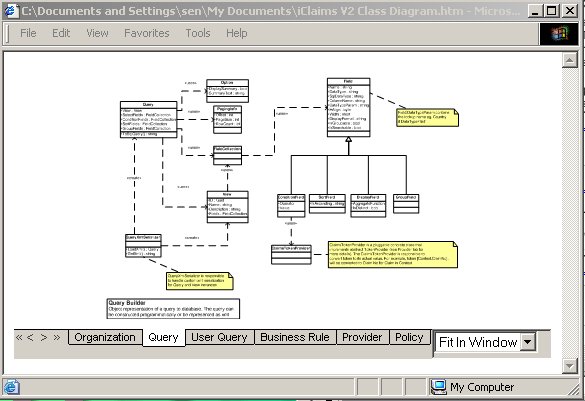
Sharing Visio Diagram

In my current company, I create a lot of database and class diagram using Visio for Enterprise Architects (the one that comes with VS.NET 2003 Enterprise Architect) and share it to other people. The fellow developers who have VS.NET 2003 Professional always have problem viewing the file, because they don't have Visio installed in their machine.

Installing Visio Viewer 2003 won't help much. You can open Visio file from inside Internet Explorer, but the result is often unpredictable: contents of the entity diagram tends to overflow the table boundary, the line thickness is not correct, etc. Basically, I am not satisfied. The only solution is to print on paper and distribute, until now.

I just discovered (doh!) that we can publish Visio diagram as web pages. The result is not much different as the original diagram viewed inside Visio. I do notice some minor defects like dashed line is converted to solid line. But so far the defects are insignificant.


In case you haven't discovered, to export Visio diagram to web page, just choose File - Save As Web Page.

Inside the dialog box, you can set some parameters. In my observation, some options don't really affect the performance. I can't make the Custom Properties working as well, so I opt out this option to remove the empty space reserved for this feature.

Visio will create a lot of html and vml file and pack them into a folder. I move this folder to our development web server and instantly everyone in the team can access the Visio diagram. The diagram is drawn using VML (Vector Markup Language) so it still looks nice even when we zoom in/out.

Thursday, February 16, 2006

Separation of Roles

As a software developer, sometimes I come into situation when I have to code in all layers/tiers of the application. In the web development context using Microsoft technology (where most of my experience is in), it means writing code in Javascript, deal with divs and tables in HTML, write business logic in C# and all the way down to writing stored procedures. Working in this manner is nothing bad, since I can get the full picture of the process, from the moment the user input the data to the data being saved in the database. Quite surprisingly, this happens in most of the companies that I have worked for, regardless of the project size.

The multi-responsibility role that a developer has to bear is quite common nowadays. Take a peak at the online job posts and you can easily notice that most developer job openings always look for the all-rounder candidate who can do from A-Z and has experience working in all tiers.

I agree in a small development project, we don't have the luxury of proper design and planning. Thus work items are actually screens from a prototype, and often a single developer is assigned to code the screen from UI tier to database tier. However, when the project gets larger and more developers join in, I suggest developers are split into several distinct roles:

1. UI/Front-end developers. These people are most experienced in event-driven nature of UI programming. In the web development projects, these are the type of developers who are fluent in client side scripting, prefer to hand code HTML code, fully understand the difference between a listbox and a dropdownlist, etc.

2. Middle tier developers. These people deals with business object classes, web services, and data access layer classes.

3. Database developers. They live in different side of the world than the other two types of developers. They speak only in TSQL. Their tools is Enterprise Manager and Query Analyzer instead of Visual Studio.


Those projects who have clear separation of roles enjoy the following benefits (which are derived from my experience working in such project):

1. The right man on the right place. Almost like a cliche, but it is true. Most developers will say 'yes' they can work in every tier, but in fact they are more effective working in one tier compared to other tiers. A developer's past experience can tell much about this. Face this fact: developers who write well in object-oriented Javascript may not effectively write a business object classes in C#, or even write a sophisticated stored procedure in TSQL with proper error handling management.

2. Promote separation of responsibility on each tier, an important concept in object orientation. Alhough only by a proper design a truly separation of responsibility can be achieved, having different developers on each tier will ensure there is no code that sit in the wrong place because they are written by different developers.

3. Each tier can be planned and progressed independently. For example, after the database design is done, the database developers can start working on the stored procedures. Meanwhile, once the class diagram is done, the middle tier guys can start creating classes. Usually, the UI developers will start later and finish later as they have to work on the prototype and go through iterative release-feedback process with the client.

4. Easier to implement programming standard and convention. Take this example: Naming convention for strongly-typed C# is different from loosely-typed Javascript. Syntax in TSQL are more effective in resultset, while C# developers are more used to loops.

5. Promote communication. In my previous company, developers on the same role sit next to each other on the same corner, thus promoting communication and code reuse among them. In a 20-people team which everybody works on the stored procedures, not everybody know what other people have done.


As I mention earlier, the separation of roles may not be suitable for a small project where resource is limited. It is also not an all-good solution. The following are some disadvantages:

1. Developers may know understand the whole picture as they only work in one tier instead of all tiers.

2. Harder to track bugs and performance issues that run across tiers and other performance issues because of point no 1. If bug tracking is not manage properly, developers may start finger pointing on each other.